Pour toute question sur ce produit, contactez-nous au +216 71 802 806 ou sur WhatsApp.
Caractéristiques techniques
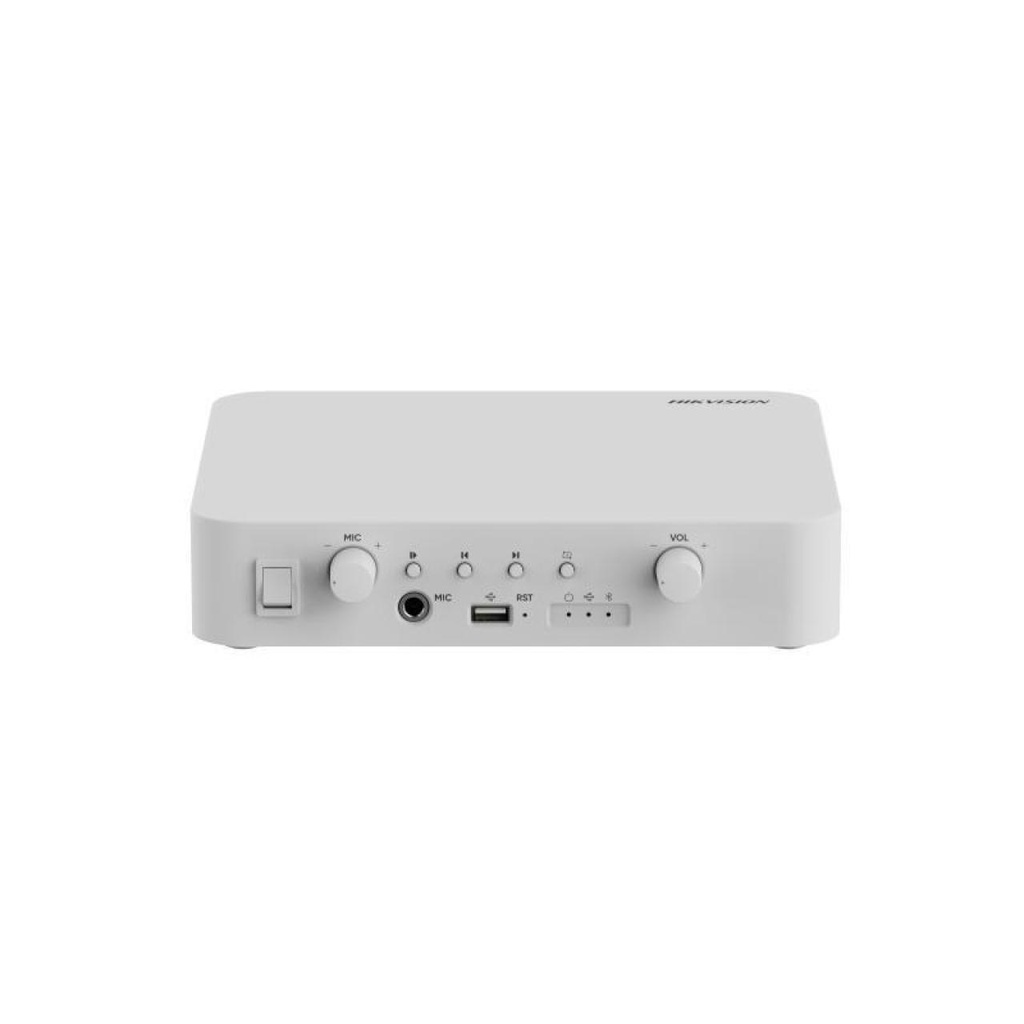
Extrait de la fiche technique du fabricant (PDF joint, Fiche technique DS-QAE1A40G1-VB.pdf).
| QuickStartGuide |
| UD38916B-ANetworkAmplifierIndicators : |
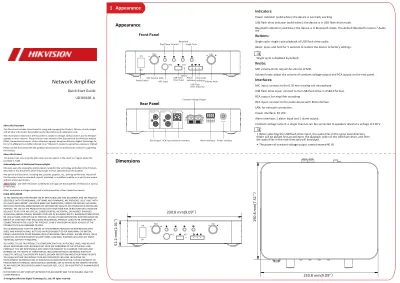
| Powerindicator(solidwhite):thedeviceisnormallyworking. |
| USBflashdriveindicator(solidwhite):thedeviceisinUSBflashdrivemode. |
| Bluetoothindicator(solidblue):thedeviceisinBluetoothmode. ThedefaultBluetoothnameis"Audio |
| xxx". |
| Buttons: |
| Singlecycle:singlecycleplaybackofUSBflashdriveaudio . |
| Reset:pressandholdfor5secondstorestorethedevicetofactorysettings. |
| Knobs: |
| MICvolumeknob:adjustthevolumeofMIC. |
| Volumeknob:adjustthevolumeofconstantvoltageoutputandRCAoutputontherearpanel. |
| Interfaces: |
| MICinput:connecttothe6.35mmmoving-coilmicrophone. |
| USBflashdriveinput:connecttotheUSBflashdriveinUSB2.0format. |
| RCAoutput:foramplifiercascading. |
| RCAinput:connecttotheaudiodevicewithRCAinterface. |
| LAN:fornetworkconnection. |
| Powerinterface:24VDC. |
| Alarminterface:1alarminputand1alarmoutput. |
| Constantvoltageoutput: asinglechannelcanbeconnectedtospeakersratedatavoltageof100V.Singlecycleisdisabledbydefault. |
| PowerSwitchMICInputUSBFlash |
| DriveInputPower |
| Indicator |
| USBFlash |
| DriveIndicatorBluetooth |
| IndicatorPlay/PauseForwardBackward |
| SingleCycle |
| VolumeKnobMICVolumeKnobMIC |
| MICON |
| OFFVOLFrontPanel |
| PowerInterfaceConstantVoltageOutput |
| RCAInputNetworkInterface AlarmInterface RCAOutputAboutthisDocument |
| ThisDocumentincludesinstructionsforusingandmanagingtheProduct.Pictures,charts,images |
| andallotherinformationhereinafterarefordescriptionandexplanationonly. |
| TheinformationcontainedintheDocumentissubjecttochange,withoutnotice,duetofirmware |
| updatesorotherreasons.PleasefindthelatestversionoftheDocumentattheHikvisionwebsite |
| (https://www.hikvision.com).Unlessotherwiseagreed,HangzhouHikvisionDigitalTechnologyCo., |
| Ltd.oritsaffiliates(hereinafterreferredtoas"Hikvision")makesnowarranties,expressorimplied. |
| PleaseusetheDocumentwiththeguidanceandassistanceofprofessionalstrainedinsupporting |
| theProduct. |
| AboutthisProduct |
| Thisproductcanonlyenjoytheafter-salesservicesupportinthecountryorregionwherethe |
| purchaseismade. |
| AcknowledgmentofIntellectualPropertyRights |
| describedinthisDocument,whichmayincludelicensesobtainedfromthirdparties. |
| AnypartoftheDocument,includingtext,pictures,graphics,etc.,belongstoHikvision.Nopartof |
| thisDocumentmaybeexcerpted,copied,translated,ormodifiedinwholeorinpartbyanymeans |
| withoutwrittenpermission. |
| andotherHikvision’strademarksandlogosarethepropertiesofHikvisioninvarious |
| jurisdictions. |
| Othertrademarksandlogosmentionedarethepropertiesoftheirrespectiveowners. |
| LEGALDISCLAIMER |
| TOTHEMAXIMUMEXTENTPERMITTEDBYAPPLICABLELAW,THISDOCUMENTANDTHEPRODUCT |
| DESCRIBED,WITHITSHARDWARE,SOFTWAREANDFIRMWARE,AREPROVIDED"ASIS"AND"WITH |
| ALLFAULTSANDERRORS".HIKVISIONMAKESNOWARRANTIES,EXPRESSORIMPLIED,INCLUDING |
| WITHOUTLIMITATION,MERCHANTABILITY,SATISFACTORYQUALITY,ORFITNESSFORAPARTICULAR |
| PURPOSE.THEUSEOFTHEPRODUCTBYYOUISATYOUROWNRISK.INNOEVENTWILLHIKVISION |
| BELIABLETOYOUFORANYSPECIAL,CONSEQUENTIAL,INCIDENTAL,ORINDIRECTDAMAGES, |
| INCLUDING,AMONGOTHERS,DAMAGESFORLOSSOFBUSINESSPROFITS,BUSINESSINTERRUPTION, |
| ORLOSSOFDATA,CORRUPTIONOFSYSTEMS,ORLOSSOFDOCUMENTATION,WHETHERBASEDON |
| BREACHOFCONTRACT,TORT(INCLUDINGNEGLIGENCE),PRODUCTLIABILITY,OROTHERWISE,IN |
| CONNECTIONWITHTHEUSEOFTHEPRODUCT,EVENIFHIKVISIONHASBEENADVISEDOFTHE |
| POSSIBILITYOFSUCHDAMAGESORLOSS. |
| YOUACKNOWLEDGETHATTHENATUREOFTHEINTERNETPROVIDESFORINHERENTSECURITY |
| RISKS,ANDHIKVISIONSHALLNOTTAKEANYRESPONSIBILITIESFORABNORMALOPERATION, |
| PRIVACYLEAKAGEOROTHERDAMAGESRESULTINGFROMCYBER-ATTACK,HACKERATTACK,VIRUS |
| INFECTION,OROTHERINTERNETSECURITYRISKS;HOWEVER,HIKVISIONWILLPROVIDETIMELY |
| TECHNICALSUPPORTIFREQUIRED. |
| YOUAGREETOUSETHISPRODUCTINCOMPLIANCEWITHALLAPPLICABLELAWS,ANDYOUARE |
| SOLELYRESPONSIBLEFORENSURINGTHATYOURUSECONFORMSTOTHEAPPLICABLELAW. |
| ESPECIALLY,YOUARERESPONSIBLE,FORUSINGTHISPRODUCTINAMANNERTHATDOESNOT |
| INFRINGEONTHERIGHTSOFTHIRDPARTIES,INCLUDINGWITHOUTLIMITATION,RIGHTSOF |
| PUBLICITY,INTELLECTUALPROPERTYRIGHTS,ORDATAPROTECTIONANDOTHERPRIVACYRIGHTS. |
| YOUSHALLNOTUSETHISPRODUCTFORANYPROHIBITEDEND-USES,INCLUDINGTHE |
| DEVELOPMENTORPRODUCTIONOFWEAPONSOFMASSDESTRUCTION,THEDEVELOPMENTOR |
| PRODUCTIONOFCHEMICALORBIOLOGICALWEAPONS,ANYACTIVITIESINTHECONTEXTRELATED |
| TOANYNUCLEAREXPLOSIVEORUNSAFENUCLEARFUEL-CYCLE,ORINSUPPORTOFHUMANRIGHTS |
| ABUSES. |
| INTHEEVENTOFANYCONFLICTSBETWEENTHISDOCUMENTANDTHEAPPLICABLELAW,THE |
| LATTERPREVAILS. |
| Appearance1 |
| Appearance |
| RearPanel |
| Dimensions• WhenselectingtheUSBflashdriveinput,theaudiofilesinthesameleveldirectory |
| folderwillbeplayedfirstaccordingtotheplaybackorderoftheUSBflashdrive,andthen |
| theaudiofilesintherootdirectorywillbeplayed. |
| • Thepowerofconstantvoltageoutputcannotexceed40W.ResetRST |
| RCAOUT RCAIN LAN |
| 100VCOM |
| ALARM |
| OUTALARM |
| IN |
| 1A1BGNDINDC24V51.2mm(2.01")MIC |
| MIC RSTON |
| OFFVOL190.8mm(7.51" |
| ) |
| 230.8mm(9.09")230.8mm(9.09") |
| Placethedevicedirectlyonasturdyandstabletable.Usethestandardpoweradapter. |
| Completewiringbeforeinstallation. |
| Makesurealltherelatedequipmentis |
| power-offduringtheinstallation. |
| Warning |
| • Refertothedevicelabelforthestandardpowersupply.Pleasemakesureyourpowersupplymatcheswithyourdevice. |
| • Intheuseoftheproduct,youmustbeinstrictcompliancewiththeelectricalsafetyregulationsofthenationandregion. |
| • CAUTION:Ifthefuseofthedevicecanbereplaced,replaceitonlywiththesamemodeltoreducetheriskoffireorelectricshock. |
| • CAUTION:Ifthedeviceneedstobeinstalledwithaspecificbracketofourcompany,usethecorrespondingbracketonly.Useothers(suchascarts,stands,andcarriers)may |
| resultininstabilityandcauseinjury.Refertothedevicedatasheetforbracketmodeldetails.Refertodatasheetfordetails. |
| • Forthedevicewithsoundplayingfunction,topreventpossiblehearingdamage,donotlistenathighvolumelevelsforlongperiods.Refertotheusermanualfordetails. |
| • Refertothedevicelabelforthestandardpowersupply.Pleasemakesureyourpowersupplymatcheswithyourdevice. |
| • Makesurethatthepowerhasbeendisconnectedbeforeyouwire,install,ordisassemblethedevice. |
| • Toavoidheataccumulation,goodventilationisrequiredforaproperoperatingenvironment. |
| • Ifsmoke,odor,ornoisearisesfromthedevice,immediatelyturnoffthepower,unplugthepowercable,andcontacttheservicecenter. |
| • Iftheproductdoesnotworkproperly,pleasecontactyourdealerorthenearestservicecenter.Neverattempttodisassembletheproductyourself.Weshallnotassume |
| anyresponsibilityforproblemscausedbyunauthorizedrepairormaintenance. |
| Caution |
| • Forthebatterywith+and-signs,+identifiesthepositiveterminalsofthedevicewhichisusedwithorgeneratesdirectcurrent,and-identifiesthenegativeterminalsof |
| the devicewhichisusedwithorgeneratesdirectcurrent. |
| • Nonakedflamesources,suchaslightedcandles,shouldbeplacedontheequipment. |
| • Iftheserialportofthedeviceisusedfordebuggingonly,itisreservedonlyforprofessionalsortechnicalsupportfordevicemaintenance.Refertothedocumentfor |
| details. |
| • Attachthedeviceproperlytothefloor/wallinaccordancewiththeinstallationinstructionstopreventinjury.Refertothedocumentfordetails. |
| • DONOTdroptheproductorsubjectittophysicalshock.Donotinstalltheproductonvibratorysurfaceorplaces. |
| • DONOTexposethedevicetohighelectromagneticradiation. |
| • DONOTexposethedevicetoextremelyhot,cold,dusty,corrosive,saline-alkali,ordampenvironments.Fortemperatureandhumidityrequirements,refertothe |
| datasheetfor details. |
| • DONOTinstallindoorproductwhereitmaygetwetbywaterorotherliquid. |
| • Toavoidfirehazardorelectricshock,DONOTexposethedevicetorainorextremelydampenvironments. |
| • AccessingtotheInternetmaycausenetworksecurityproblems.Pleasestrengthentheprotectionofyourpersonalinformationanddatasecurity.Whenyoufindthatthe |
| devicemayhavenetworksecurityrisks,pleasecontactusintime. |
| • Properconfigurationofallpasswordsandothersecuritysettingsistheresponsibilityofthe installerand/orend-user. |
| • Keepallwrappersafterunpackingthemforfutureuse.Incaseofanyfailureoccurred,youneedtoreturnthedevicetothefactorywiththeoriginalwrapper. |
| Transportation withouttheoriginalwrappermayresultindamageonthedeviceandthecompanyshallnottakeanyresponsibilities. |
| • Thisinstallationshouldbemadebyaqualifiedservicepersonandshouldconformtoallthelocalcodes.Note |
| Installation&Wiring2 QuickSetup3 |
| Youshouldactivatethedevicebeforethefirstlogin.Afterpowering |
| onthedevice,thesystemwillswitchto DeviceActivationpage. |
| Wehighlyrecommendyouchangethepasswordofyour |
| ownchoosing(usingaminimumof8characters,including |
| atleastthreekinds offollowingcategories:uppercase |
| letters,lowercaseletters,numbers,andspecialcharacters) |
| inordertoincreasethesecurityofyour product.ActivateviaWebBrowser |
| 1.GotoConfiguration ->Network->NetworkSettings ->TCP/IPfor |
| parametersettings. |
| 2.NetworkParameterSettings |
| -Manuallyenterthe IPv4Address ,IPv4SubnetMask ,IPv4Default |
| Gateway,PreferredDNSAddress andAlternateAddress . |
| -CheckAutoDNStoobtaintheparametersautomatically. |
| 3.ClickSave. |
| 1.GotoConfiguration ->BroadcastSettings ->Librarytoimport |
| broadcastmaterials. |
| 2.GotoConfiguration ->BroadcastSettings ->Scheduled |
| Broadcast Settingstocreatescheduledbroadcast.NetworkSettings |
| BroadcastSettings |
| Formoreinformationaboutsettings,see UserManual .1.MakesurethedeviceIPaddressandthecomputer'sshouldbein |
| thesameIPsegment. |
| 2.EnterthedevicedefaultIPaddress(192.168.1.64)intheaddress |
| barofthewebbrowser,andpress Enter. |
- Livraison Aramex partout en Tunisie : 8,000 DT TTC par commande.
- Retrait gratuit au 26 rue Chedly Kallala, Lafayette, Tunis.
- Paiement à la livraison ou par virement bancaire.
- Installation par nos techniciens sur demande (devis).
- Retour possible sous 10 jours ouvrables : voir nos conditions générales de vente.
Spécifications
| Marque | Hikvision |