Pour toute question sur ce produit, contactez-nous au +216 71 802 806 ou sur WhatsApp.
Caractéristiques techniques
Extrait de la fiche technique du fabricant (PDF joint, Fiche technique DS-QAE0A60G1-VB.pdf).
| QuickStartGuide |
| UD34557B-BAnalogAmplifierIndicators : |
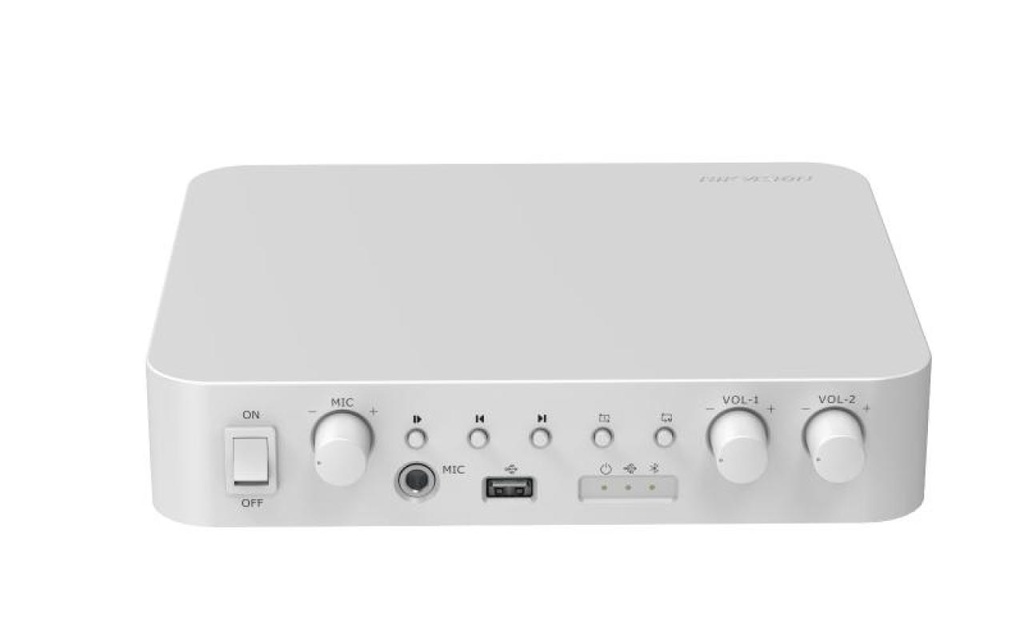
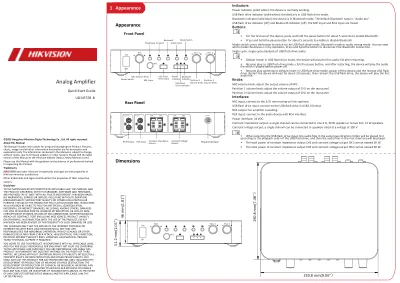
| Powerindicator(solidwhite):thedeviceisnormallyworking. |
| USBflashdriveindicator(solidwhite):thedeviceisinUSBflashdrivemode. |
| Bluetoothindicator(solidblue):thedeviceisinBluetoothmode. ThedefaultBluetoothnameis"Audioxxx". |
| USBflashdriveindicator(off)andBluetoothindicator(off):theMICinputandRCAinputaremixed. |
| Buttons: |
| • Forthefirstuseofthedevice,pressandholdthepausebuttonforabout5secondstoenableBluetooth. |
| • Pressandholdthepausebuttonforabout5secondstoenableordisableBluetooth. |
| Modeswitch:pressthebottonto switchtothe USBflashdrivemode,Bluetoothmodeoraudiomixingmode.Youcanviewwhichmodethedeviceisinbyindicators .PressandholdthebottontodisconnecttheBluetoothconnection. |
| Singlecycle:singlecycleplaybackofUSBflashdriveaudio . |
| • Defaultmode: inUSBflashdrivemode, thedevicewillplaythefirstaudiofile afterrestarting . |
| • Resumeplay:inUSBflashdrivemode,clickthepausebutton,andafterrestarting,thedevicewillplaytheaudiofilewhichisplayedbeforepower-off. |
| • Resumeplayswitchingtodefaultmode:inUSBflashdrivemode,poweroffthedeviceandtheremoveUSBflashdrive.Restartthedeviceandwaitforabout20seconds,thenreinserttheUSBflashdrive,thedevicewillplaythefirstaudiofile. |
| Knobs: |
| MICvolumeknob:adjusttheoutputvolumeofMIC. |
| Partition1volumeknob:adjustthevolumeoutputofCH1ontherearpanel. |
| Partition2volumeknob:adjustthevolumeoutputofCH2ontherearpanel. |
| Interfaces: |
| MICinput:connecttothe6.35mmmoving-coilmicrophone. |
| USBflashdriveinput:connecttotheUSBflashdriveinUSB2.0format. |
| RCAoutput:foramplifiercascading. |
| RCAinput:connecttotheaudiodevicewithRCAinterface. |
| Powerinterface:24VDC. |
| Constantimpedanceoutput:asinglechannelcanbeconnectedtoone4Ω,30Wspeakerortotwo8Ω,15Wspeakers. |
| Constantvoltageoutput:a singlechannelcanbeconnectedtospeakersratedatavoltageof100V. |
| • WhenselectingtheUSBflashdriveinput,theaudiofilesinthesameleveldirectoryfolderwillbeplayedfirstaccordingtotheplaybackorderoftheUSBflashdrive,andthentheaudiofilesintherootdirectorywillbeplayed. |
| • ThetotalpowerofconstantimpedanceoutputCH1andconstantvoltageoutputCH1cannotexceed60W. |
| • ThetotalpowerofconstantimpedanceoutputCH2andconstantvoltageoutputCH2cannotexceed60W. |
| PowerSwitchMICInputUSBFlash |
| DriveInputPower |
| Indicator |
| USBFlash |
| DriveIndicatorBluetooth |
| IndicatorPlay/Pause ForwardBackward |
| SingleCycleModeSwitch |
| Partition1 |
| VolumeKnobPartition2 |
| VolumeKnobMICVolumeKnobMIC |
| MICON |
| OFFVOL-1 VOL-2FrontPanel |
| RCAINCH2 |
| 4Ω-8ΩCH1 |
| 4Ω-8ΩCH1 |
| 100VCH2 |
| 100VDC24V |
| PowerInterfaceConstantImpedance |
| OutputConstantVoltage |
| OutputRCAInputRCAOUT |
| RCAOutput46mm(1.81")51.2mm(2.01")MIC |
| MICON |
| OFFVOL-1 VOL-2190.8mm(7.48" |
| ) |
| 230.8mm (9.06")©2023HangzhouHikvisionDigitalTechnologyCo.,Ltd.Allrightsreserved. |
| AboutthisManual |
| TheManualincludesinstructionsforusingandmanagingtheProduct.Pictures, |
| charts,imagesandallotherinformationhereinafterarefordescriptionand |
| explanationonly.The informationcontainedintheManualissubjecttochange, |
| withoutnotice,duetofirmware updatesorotherreasons.Pleasefindthelatest |
| versionofthisManualattheHikvision website(https://www.hikvision.com/). |
| PleaseusethisManualwiththeguidanceandassistanceofprofessionalstrained |
| insupportingtheProduct. |
| Trademarks |
| andotherHikvision’strademarksandlogosarethepropertiesof |
| Othertrademarksandlogosmentionedarethepropertiesoftheirrespective |
| owners. |
| Disclaimer |
| TOTHEMAXIMUMEXTENTPERMITTEDBYAPPLICABLELAW,THISMANUALAND |
| THEPRODUCTDESCRIBED,WITHITSHARDWARE,SOFTWAREANDFIRMWARE, |
| AREPROVIDED “ASIS”AND“WITHALLFAULTSANDERRORS”.HIKVISIONMAKES |
| NOWARRANTIES, EXPRESSORIMPLIED,INCLUDINGWITHOUTLIMITATION, |
| MERCHANTABILITY, SATISFACTORYQUALITY,ORFITNESSFORAPARTICULAR |
| PURPOSE.THEUSEOFTHE PRODUCTBYYOUISATYOUROWNRISK.INNOEVENT |
| WILLHIKVISIONBELIABLETOYOU FORANYSPECIAL,CONSEQUENTIAL, |
| INCIDENTAL,ORINDIRECTDAMAGES,INCLUDING, AMONGOTHERS,DAMAGES |
| FORLOSSOFBUSINESSPROFITS,BUSINESSINTERRUPTION, ORLOSSOFDATA, |
| CORRUPTIONOFSYSTEMS,ORLOSSOFDOCUMENTATION,WHETHER BASEDON |
| BREACHOFCONTRACT,TORT(INCLUDINGNEGLIGENCE),PRODUCTLIABILITY, |
| OROTHERWISE,INCONNECTIONWITHTHEUSEOFTHEPRODUCT,EVENIF |
| YOUACKNOWLEDGETHATTHENATUREOFTHEINTERNETPROVIDESFOR |
| INHERENT SECURITYRISKS,ANDHIKVISIONSHALLNOTTAKEANY |
| RESPONSIBILITIESFORABNORMAL OPERATION,PRIVACYLEAKAGEOROTHER |
| DAMAGESRESULTINGFROMCYBER-ATTACK, HACKERATTACK,VIRUSINFECTION, |
| OROTHERINTERNETSECURITYRISKS;HOWEVER, HIKVISIONWILLPROVIDE |
| TIMELYTECHNICALSUPPORTIFREQUIRED. |
| YOUAGREETOUSETHISPRODUCTINCOMPLIANCEWITHALLAPPLICABLELAWS, |
| ANDYOUARESOLELYRESPONSIBLEFORENSURINGTHATYOURUSECONFORMS |
| TOTHEAPPLICABLELAW.ESPECIALLY,YOUARERESPONSIBLE,FORUSINGTHIS |
| PRODUCTINA MANNERTHATDOESNOTINFRINGEONTHERIGHTSOFTHIRD |
| PARTIES,INCLUDING WITHOUTLIMITATION,RIGHTSOFPUBLICITY,INTELLECTUAL |
| PROPERTYRIGHTS,ORDATA PROTECTIONANDOTHERPRIVACYRIGHTS.YOU |
| SHALLNOTUSETHISPRODUCTFORANY PROHIBITEDEND-USES,INCLUDINGTHE |
| DEVELOPMENTORPRODUCTIONOFWEAPONS OFMASSDESTRUCTION,THE |
| DEVELOPMENTORPRODUCTIONOFCHEMICALOR BIOLOGICALWEAPONS,ANY |
| ACTIVITIESINTHECONTEXTRELATEDTOANYNUCLEAR EXPLOSIVEORUNSAFE |
| NUCLEARFUEL-CYCLE,ORINSUPPORTOFHUMANRIGHTS ABUSES.INTHEEVENT |
| OFANYCONFLICTSBETWEENTHISMANUALANDTHEAPPLICABLE LAW,THE |
| LATTERPREVAILS. |
| Appearance1 |
| Appearance |
| RearPanel |
| Dimensions |
| Usethestandardpoweradapter. |
| Completewiringbeforeinstallation. |
| Makesurealltherelatedequipmentispower-offduringthe |
| installation. |
| MIC |
| MICON |
| OFFVOL-1 VOL-2 |
| Table |
| Warning |
| • Refertothedevicelabelforthestandardpowersupply.Pleasemakesureyourpowersupplymatcheswithyourdevice. |
| • Intheuseoftheproduct,youmustbeinstrictcompliancewiththeelectricalsafetyregulationsofthenationandregion. |
| • CAUTION:Ifthefuseofthedevicecanbereplaced,replaceitonlywiththesamemodeltoreducetheriskoffireorelectricshock. |
| • CAUTION:Ifthedeviceneedstobeinstalledwithaspecificbracketofourcompany,usethecorrespondingbracketonly.Useothers(suchascarts,stands,andcarriers)mayresultininstabilityandcauseinjury. |
| Refertothedevicedatasheetforbracketmodeldetails.Refertodatasheetfordetails. |
| • Forthedevicewithsoundplayingfunction,topreventpossiblehearingdamage,donotlistenathighvolumelevelsforlongperiods.Refertotheusermanualfordetails. |
| • Refertothedevicelabelforthestandardpowersupply.Pleasemakesureyourpowersupplymatcheswithyourdevice. |
| • Makesurethatthepowerhasbeendisconnectedbeforeyouwire,install,ordisassemblethedevice. |
| • Toavoidheataccumulation,goodventilationisrequiredforaproperoperatingenvironment. |
| • Ifsmoke,odor,ornoisearisesfromthedevice,immediatelyturnoffthepower,unplugthepowercable,andcontacttheservicecenter. |
| • Iftheproductdoesnotworkproperly,pleasecontactyourdealerorthenearestservicecenter.Neverattempttodisassembletheproductyourself.Weshallnotassumeany responsibilityforproblemscausedby |
| unauthorizedrepairormaintenance. |
| Caution |
| • Forthebatterywith+and-signs,+identifiesthepositiveterminalsofthedevicewhichisusedwithorgeneratesdirectcurrent,and-identifiesthenegativeterminalsofthe devicewhichisusedwithorgenerates |
| directcurrent. |
| • Nonakedflamesources,suchaslightedcandles,shouldbeplacedontheequipment. |
| • Iftheserialportofthedeviceisusedfordebuggingonly,itisreservedonlyforprofessionalsortechnicalsupportfordevicemaintenance.Refertothedocumentfordetails. |
| • Attachthedeviceproperlytothefloor/wallinaccordancewiththeinstallationinstructionstopreventinjury.Refertothedocumentfordetails. |
| • DONOTdroptheproductorsubjectittophysicalshock.Donotinstalltheproductonvibratorysurfaceorplaces. |
| • DONOTexposethedevicetohighelectromagneticradiation. |
| • DONOTexposethedevicetoextremelyhot,cold,dusty,corrosive,saline-alkali,ordampenvironments.Fortemperatureandhumidityrequirements,refertothedatasheetfor details. |
| • DONOTinstallindoorproductwhereitmaygetwetbywaterorotherliquid. |
| • Toavoidfirehazardorelectricshock,DONOTexposethedevicetorainorextremelydampenvironments. |
| • AccessingtotheInternetmaycausenetworksecurityproblems.Pleasestrengthentheprotectionofyourpersonalinformationanddatasecurity.Whenyoufindthatthedevice mayhavenetworksecurityrisks, |
| pleasecontactusintime. |
| • Properconfigurationofallpasswordsandothersecuritysettingsistheresponsibilityofthe installerand/orend-user. |
| • Keepallwrappersafterunpackingthemforfutureuse.Incaseofanyfailureoccurred,youneedtoreturnthedevicetothefactorywiththeoriginalwrapper.Transportation withouttheoriginalwrappermayresult |
| indamageonthedeviceandthecompanyshallnottakeanyresponsibilities. |
| • Thisinstallationshouldbemadebyaqualifiedservicepersonandshouldconformtoallthelocalcodes.Note |
| Installation2 |
| 4Ω 30WCH2 |
| 4Ω-8ΩCH1 |
| 4Ω-8ΩCH1 |
| 100VCH2 |
| 100VCH2 |
| 4Ω-8ΩCH1 |
| 4Ω-8ΩCH1 |
| 100VCH2 |
| 100VCH2 |
| 4Ω-8ΩCH1 |
| 4Ω-8ΩCH1 |
| 100VCH2 |
| 100V |
| 8Ω 15W 8Ω 15W 8Ω 15W 8Ω 15WRefertothediagrambelowforwiring.Wiring |
| Placethedevicedirectlyonasturdyandstabletable.Installation |
| RCAOUT |
| RCAINAmplifier Cascading |
- Livraison Aramex partout en Tunisie : 8,000 DT TTC par commande.
- Retrait gratuit au 26 rue Chedly Kallala, Lafayette, Tunis.
- Paiement à la livraison ou par virement bancaire.
- Installation par nos techniciens sur demande (devis).
- Retour possible sous 10 jours ouvrables : voir nos conditions générales de vente.
Spécifications
| Marque | Hikvision |