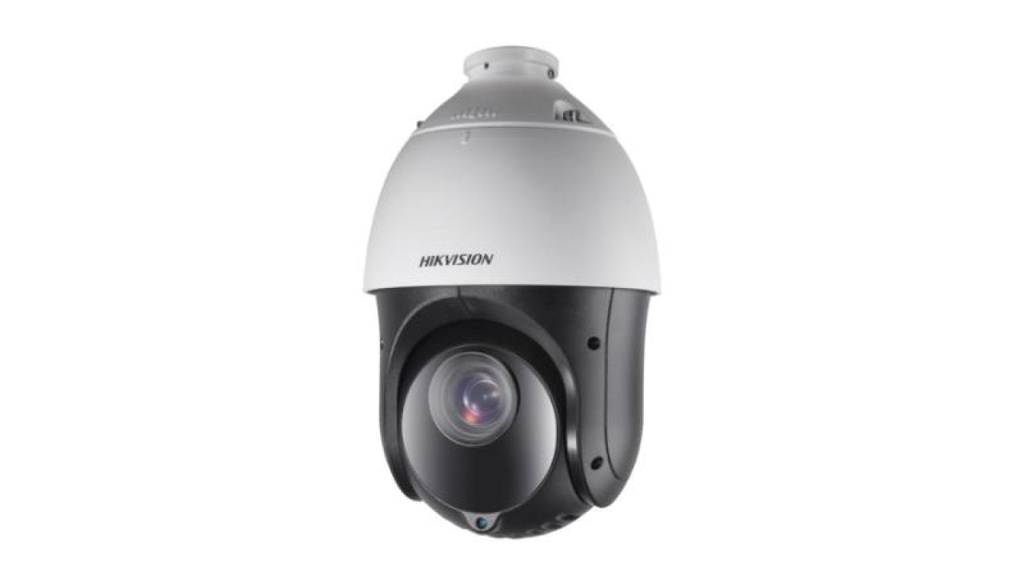
Pour toute question sur ce produit, contactez-nous au +216 71 802 806 ou sur WhatsApp.
Caractéristiques techniques
Extrait de la fiche technique du fabricant (PDF joint, Fiche technique DS-2AE4225TI-D.pdf).
| HD-TVI Speed Dome |
| Quick Start Guide |
| HD-TVI Speed Dome ·Quick Start Guide |
| ii Quick Start Guide |
| COPYRIGHT © 2018 Hangzhou Hikvision Digital Technology Co., Ltd. |
| ALL RIGHTS RESERVED. |
| Any and all information, including, among others, wordings, pictures, graphs are the properties of |
| Hangzhou Hikvision Digital Technology Co., Ltd. or its subsidiaries (hereinafter referred to be |
| “Hikvision”). This user manual (hereinafter referred to be “the Manual”) cannot be reproduced, |
| changed, translated, or distributed, partially or wholly, by any means, without the prior written |
| permission of Hikvision. Unless otherwise stipulated, Hikvision does not make any warranties, |
| guarantees or representations, express or implied, regarding to the Manual. |
| About this Manual |
| This Manual is ap plicable to HD-TVI Speed Dome. |
| The Manual includes instructions for using and managing the product. Pictures, charts, images and |
| all other information hereinafter are for description and explanation only. The information |
| contained in the Manual is subject to change, without notice, due to firmware updates or other |
| reasons. Please find the latest version in the company website ( http://overseas.hikvision.com/en/ ). |
| Please use this user manual under the guidanc e of professionals. |
| Trademarks Acknowledgement |
| and other Hikvision's trademarks and logos are the properties of Hikvision in |
| various jurisdictions. Other trademarks and logos mentioned below are the properties of their |
| respective owners. |
| Legal Disclaimer |
| TO THE MAXIMUM EXTENT PERMITTED BY APPLICABLE LAW, THE PRODUCT DESCRIBED, WITH ITS |
| HARDWARE, SOFTWARE AND FIRMWARE, IS PROVIDED “AS IS”, WITH ALL FAULTS AND ERRORS, |
| AND HIKVISION MAKES NO WARRANTIES, EXPRESS OR IMPLIED, INCLUDING WITHOUT |
| LIMITATION, MERCHA NTABILITY, SATISFACTORY QUALITY, FITNESS FOR A PARTICULAR PURPOSE, |
| AND NON -INFRINGEMENT OF THIRD PARTY. IN NO EVENT WILL HIKVISION, ITS DIRECTORS, |
| OFFICERS, EMPLOYEES, OR AGENTS BE LIABLE TO YOU FOR ANY SPECIAL, CONSEQUENTIAL, |
| INCIDENTAL, OR INDIRECT DAMAG ES, INCLUDING, AMONG OTHERS, DAMAGES FOR LOSS OF |
| BUSINESS PROFITS, BUSINESS INTERRUPTION, OR LOSS OF DATA OR DOCUMENTATION, IN |
| CONNECTION WITH THE USE OF THIS PRODUCT, EVEN IF HIKVISION HAS BEEN ADVISED OF THE |
| POSSIBILITY OF SUCH DAMAGES. |
| REGARDING TO THE PRODUCT WITH INTERNET ACCESS, THE USE OF PRODUCT SHALL BE WHOLLY |
| AT YOUR OWN RISKS. HIKVISION SHALL NOT TAKE ANY RESPONSIBILITES FOR ABNORMAL |
| OPERATION, PRIVACY LEAKAGE OR OTHER DAMAGES RESULTING FROM CYBER ATTACK, HACKER |
| ATTACK, VIRUS INSPECTION, OR OTHER INTERNET SECURITY RISKS; HOWEVER, HIKVISION WILL |
| PROVIDE TIMELY TECHNICAL SUPPORT IF REQUIRED. |
| SURVEILLANCE LAWS VARY BY JURISDICTION. PLEASE CHECK ALL RELEVANT LAWS IN YOUR |
| JURISDICTION BEFORE USING THIS PRODUCT IN ORDER TO ENSURE THAT YOUR USE CONFORMS |
| THE APPLICABLE LAW. HIKVISION SHALL NOT BE LIABLE IN THE EVENT THAT THIS PRODUCT IS USED |
| WITH ILLEGITIMATE PURPOSES. |
| IN THE EVENT OF ANY CONFLICTS BETWEEN THIS MANUAL AND THE APPLICABLE LAW, THE LATER |
| PREVAILS . |
| Regulatory Information |
| FCC Information |
| FCC compliance: This equipment has been tested and found to comply with the limits for a digital |
| device, pursuant to part 15 of the FCC Rules. These limits are designed to provide reasonable |
| protection against harmful interference when the equipment is operate d in a commercial |
| HD-TVI Speed Dome ·Quick Start Guide |
| iii environment. This equipment generates, uses, and can radiate radio frequency energy and, if not |
| installed and used in accordance with the instruction manual, may cause harmful interference to |
| radio communications. Operation of this equipm ent in a residential area is likely to cause harmful |
| interference in which case the user will be required to correct the interference at his own expense. |
| FCC Conditions |
| This device complies with part 15 of the FCC Rules. Operation is subject to the followi ng two |
| conditions: |
| 1. This device may not cause harmful interference. |
| 2. This device must accept any interference received, including interference that may cause |
| undesired operation. |
| EU Conformity Statement |
| This product and - if applicable - the supplied accessories too are marked |
| with "CE" and comply therefore with the applicable harmonized |
| European standards listed under the EMC Directive 20 14/30/EU , the |
| RoHS Directive 2011/65/EU. |
| 2012/19/EU (WEEE directive): Products marked with this symbol cannot |
| be d isposed of as unsorted municipal waste in the European Union. For |
| proper recycling, return this product to your local supplier upon the |
| purchase of equivalent new equipment, or dispose of it at designated |
| collection points. For more information see: www.recyclethis.info . |
| 2006/66/EC (battery directive): This product contains a battery that |
| cannot be disposed of as unsorted municipal waste in the European |
| Union. See the product documentation for specific battery inf ormation. |
| The battery is marked with this symbol, which may include lettering to |
| indicate cadmium (Cd), lead (Pb), or mercury (Hg). For proper recycling, return the battery to your |
| supplier or to a designated collection point. For more information see: www .recyclethis.info. |
| Industry Canada ICES -003 Compliance |
| This device meets the CAN ICES -3 (A)/NMB -3(A) standards requirements |
| HD-TVI Speed Dome ·Quick Start Guide |
| iv Safety Instruction |
| These instructions are intended to ensure that user can use the product correctly to avoid danger |
| or property l oss. |
| The precaution measure is divided into “Warnings” and “Cautions” |
| Warnings: Serious injury or death may occur if any of the warnings are neglected. |
| Cautions: Injury or equipment damage may occur if any of the cautions are neglected. |
| Warnings |
| All the el ectronic operation should be strict ly compliance with the electrical safety regulations, |
| fire prevent ion regulations and other related regulations in your local region . |
| Please use the power adapter, which is provided by normal company. The standard of the power |
| adapter is 24 VAC 10% or 12 VDC 10% (depending on models ). The power consumption |
| cannot be less than the required value. |
| Do not connect several devices to one power adapter as adapter overload may cause over -heat |
| or fire hazard. |
| Please make sure that the power has been disconnected before you wire, install or dismantle the |
| speed dome. |
| Whe n the product is installed on wall or ceiling, the device shall be firmly fixed. |
| If smoke, odors or noise rise from the device, turn off the power at once and unplug the power |
| cable, and then please contact the serv ice center. |
| If the product does not work properly, please contact your dealer or the nearest service center. |
| Never attempt to disassemble the speed dome yourself. (We shall not assume any responsibility |
| for problems caused by unauthorized repair or maintenance. ) |
| Cautions |
| Do not drop the dome or subject it to physical shock, and do not expose it to high |
| electromagnetism radiation. Avoid the equipment installation on vibrations surface or places |
| subject to shock (ignorance can cause equipment damage). |
| Do not place the dome in extremely hot, cold, dusty or damp locations, otherwise fire or |
| electrical shock will occur . The operating temperature should be -30° C to 65°C(outdoor speed |
| dome) and -10° C to 50°C (indoor speed dome). |
| The dome cover for indoor use shall be kept from rain and moisture. |
| Exposin g the equipment to direct sun light, low ventilation or heat source such as heater or |
| radiator is forbidden (ignorance can cause fire danger). |
| Warnings Follow |
| these safeguards to |
| prevent serious injury |
| or death. Cautions Follow these |
| precautions to prevent |
| potential injury or material |
| damage. |
| HD-TVI Speed Dome ·Quick Start Guide |
| v Do not aim the speed dome at the sun or extra bright places. A blooming or smear may occur |
| otherwise (which is no t a malfunction however), and affecting the endurance of sensor at the |
| same time. |
| Please use the provided glove when open up the dome cover, avoid direct contact with the dome |
| cover, because the acidic sweat of the fingers may erode the surface coating of the dome cover. |
| Please use a soft and dry cloth when clean inside and outside surfaces of the dome cover, do not |
| use alkaline detergents. |
| Please keep all wrappers after unpack them for future use. In case of any failure occurred, you |
| need to return the spe ed dome to the fac tory with the original wrapper. Transportation without |
| the original wrapper may result in damage on the speed dome and lead to additional costs . |
| 0304401080126 |
| HD-TVI Speed Dome ·Quick Start Guide |
| vi Table of Contents |
| 1 Installation ................................ ................................ ................................ ... 1 |
| 1.1 Connecting the Cables ................................ ................................ ................................ .............. 1 |
| 1.2 DIP Switch Settings ................................ ................................ ................................ ................... 2 |
| 1.2.1 Mini Speed Dome Settings ................................ ................................ ................................ 2 |
| 1.2.2 5-inch Speed Dome Settings ................................ ................................ .............................. 4 |
| 1.2.3 Mini IR & 5 -inch IR Speed Dome Settings ................................ ................................ .......... 7 |
| 1.2.4 7-inch IR Speed Dome Settings ................................ ................................ ........................ 10 |
| 1.3 Wiring and Installation ................................ ................................ ................................ ........... 12 |
| 1.3.1 Wiring ................................ ................................ ................................ .............................. 12 |
| 1.3.2 Installing the Mount ................................ ................................ ................................ ........ 13 |
| 1.3.3 Setting the DIP Switch ................................ ................................ ................................ ..... 14 |
| 1.3.4 Installing the Speed Dome ................................ ................................ ............................... 14 |
| 2 In-door Mounting Applications ................................ ................................ .. 16 |
| 2.1 5-inch Speed Dome In-ceiling Mounting Applications ................................ ............................ 16 |
| 2.2 5-inch Speed Dome Ceiling Mounting Applications ................................ ................................ 18 |
| 2.2.1 Removing the Mounting Mount ................................ ................................ ...................... 18 |
| 2.2.2 Wiring ................................ ................................ ................................ .............................. 19 |
| 2.2.3 Ceiling Mounting ................................ ................................ ................................ ............. 20 |
| 2.3 Mini Speed Dome In -ceiling Mounting Applications ................................ ............................... 22 |
| 2.4 Mini Speed Dome C eiling Mounting A pplications ................................ ................................ .. 24 |
| 2.4.1 Wiring ................................ ................................ ................................ .............................. 24 |
| 2.4.2 Ceiling Mounting ................................ ................................ ................................ ............. 24 |
| 3 Application and Operations ................................ ................................ ........ 26 |
| 3.1 System Application ................................ ................................ ................................ ................. 26 |
| 3.2 Basic O perations ................................ ................................ ................................ ..................... 26 |
| 3.2.1 Configuring Patrol ................................ ................................ ................................ ............ 27 |
| 3.2.2 Configuring Park Actions ................................ ................................ ................................ . 30 |
- Livraison Aramex partout en Tunisie : 8,000 DT TTC par commande.
- Retrait gratuit au 26 rue Chedly Kallala, Lafayette, Tunis.
- Paiement à la livraison ou par virement bancaire.
- Installation par nos techniciens sur demande (devis).
- Retour possible sous 10 jours ouvrables : voir nos conditions générales de vente.
Spécifications
| Type de caméra | Analogique HD |
| Résolution | 2 MP |
| Forme de caméra | PTZ / Speed dome |
| Portée IR / éclairage | 100 m |
| Technologie | DarkFighter |
| Étanchéité | IP67 |
| Marque | Hikvision |